![[PukiWiki]](https://www.masatom.in/pukiwiki/image/kinosite.png "[PukiWiki]")
|
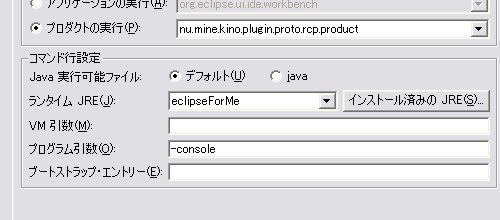
Eclipseはプラグインの起動、停止や動的追加などに、OSGi(Open Services Gateway Initiative) というフレームワークを用いています。 あんまりメリットを理解していないのですが、このOSGiのコマンドラインを起動する方法があったので、メモっておきます。 コマンドラインの起動 †Eclipse内でEclipseを起動するときに、プログラム引数に -console を付けて起動します。するとコンソールに osgi> というプロンプトが上がったはずです。 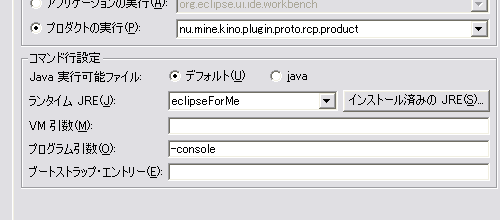 プラグインのリスト、起動状態を表示する †osgi> ss と入力します*1。結果は以下の通り(抜粋)。 osgi> ss Framework is launched. id State Bundle 0 ACTIVE system.bundle_3.1.2 1 ACTIVE org.eclipse.core.runtime_3.1.2 Fragments=34, 52 2 ACTIVE org.eclipse.update.configurator_3.1.0 Fragments=80 23 ACTIVE org.eclipse.core.expressions_3.1.0 81 RESOLVED org.eclipse.update.core_3.1.2 Fragments=82, 83 82 RESOLVED org.eclipse.update.core.nl1_3.1.1 Master=81 83 RESOLVED org.eclipse.update.core.win32_3.1.0 Master=81 84 RESOLVED org.eclipse.update.ui_3.1.1 Fragments=85 85 RESOLVED org.eclipse.update.ui.nl1_3.1.1 Master=84 86 RESOLVED org.junit_3.8.1 ACTIVEやRESOLVEDなど、プラグインのリストとそのステータスが表示されます。 あるプラグインを起動する。 †上の例で例えばorg.junit_3.8.1を起動したい場合は osgi> start 86 とします。もう一度リスト表示してみると 86 ACTIVE org.junit_3.8.1 となってACTIVEになりました。停止するには osgi> stop 86 ですね。 その他 †全部調べてませんが、とりあえず以下のコマンドがあるみたい。 ---Eclipse Runtime commands.---
diag - Displays unsatisfied constraints for the specified bundle(s).
active - Displays a list of all bundles currently in the ACTIVE state.
getprop { name } - Displays the system properties with the given name, or all of them.
Valid commands:
---Controlling the OSGi framework---
launch - start the OSGi Framework
shutdown - shutdown the OSGi Framework
close - shutdown and exit
exit - exit immediately (System.exit)
gc - perform a garbage collection
init - uninstall all bundles
setprop <key>=<value> - set the OSGi property
---Controlling Bundles---
install - install and optionally start bundle from the given URL
uninstall - uninstall the specified bundle(s)
start - start the specified bundle(s)
stop - stop the specified bundle(s)
refresh - refresh the packages of the specified bundles
update - update the specified bundle(s)
---Displaying Status---
status - display installed bundles and registered services
ss - display installed bundles (short status)
services {filter} - display registered service details
packages {<pkgname>|<id>|<location>} - display imported/exported package details
bundles - display details for all installed bundles
bundle (<id>|<location>) - display details for the specified bundle(s)
headers (<id>|<location>) - print bundle headers
log (<id>|<location>) - display log entries
---Extras---
exec <command> - execute a command in a separate process and wait
fork <command> - execute a command in a separate process
---Controlling Start Level---
sl {(<id>|<location>)} - display the start level for the specified bundle,
or for the framework if no bundle specified
setfwsl <start level> - set the framework start level
setbsl <start level> (<id>|<location>) - set the start level for the bundle(s)
setibsl <start level> - set the initial bundle start level
------Controlling the Profiling------
profilelog - Display & flush the profile log messages
---Controlling the Console---
more - More prompt for console output
config.iniについて †RCP Tutorial: Part 1にあります通り、OSGi Frameworkはconfig.iniでコンフィギュレーションするみたいです。しらなかった。。 この記事は 現在のアクセス:15016 |


 run.png